Signing In To SkySlope (For Users with Existing SkySlope Accounts)
These instructions are for MLS members who used SkySlope and had valid, active accounts with SkySlope prior to the UtahRealEstate.com offering of SkySlope that went live on March 8, 2022.
To ensure your existing forms and packets will be available within the UtahRealEstate.com version of SkySlope, please do the following:
- Match Your SkySlope and MLS Email Addresses: Make sure the email address associated with your SkySlope account matches the email address associated with your MLS account profile. Click here for instructions on how to edit your profile in the MLS where you can change your email address.
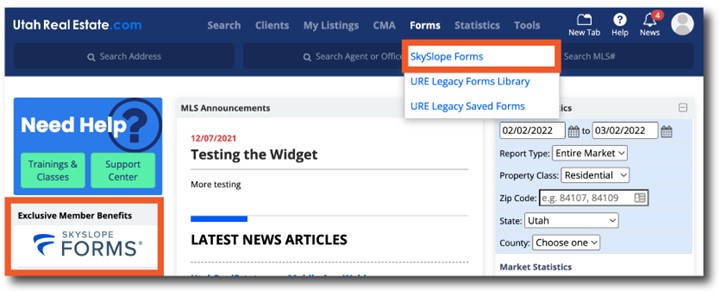
- Login to SkySlope Through the MLS: To add forms and e-signatures to your existing SkySlope account, log in to SkySlope using the links available in the MLS and complete the setup process. Logging in through the MLS, as opposed to logging in directly from SkySlope’s website, will ensure the UtahRealEstate.com version of SkySlope will be added to your existing SkySlope account.
You can log in to SkySlope Forms from the MLS from the Forms dropdown menu, or the Exclusive Member Benefits tile on your MLS Dashboard. Then, simply follow the prompts to complete the setup, which will add the UtahRealEstate.com version of SkySlope to your existing MLS account. Click here if you need help completing setup within SkySlope.