What is Autopay?
With Autopay, you place a credit/debit card on file with our payment provider. Once you have set up your card, you will be charged automatically for the plan you select. Autopay is a common payment method for modern software services. Examples of other software companies that use Autopay include Apple, Google, Netflix, DocuSign, etc.
All payment information for the autopay service is stored securely with our payment processor. Our payment processor uses advanced encryption to provide the most secure and effective method to protect sensitive cardholder data.
When will I be Charged for Autopay?
- If you are on a monthly plan, you will be billed on the final day of each calendar month for the subsequent month.
- If you are on an annual plan, you will be billed on the last day of the calendar month for the subsequent calendar year.
How do I Set Up Autopay?
Below are the steps to setting up an Autopay membership plan:
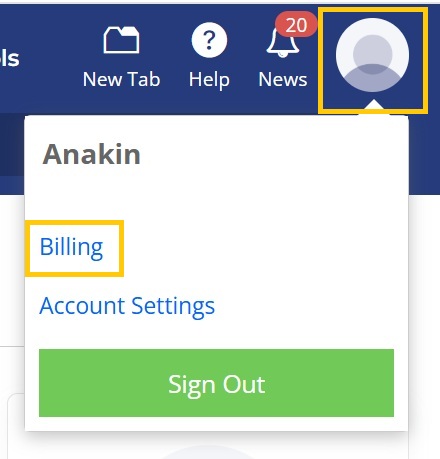
1. Click on the agent profile icon in the top right corner of the MLS, and select Billing.
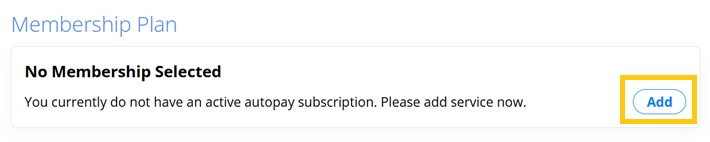
2. Under Membership Plan, select Add.
3. Select your preferred Autopay membership plan option.
4. The order total will be displayed on this page. Click on Continue to Payment.
5. Enter your billing address and credit card information. Then select Submit Payment.


